Service Designer
Who you are
You own the services every consultancy on the platform sells. A service is not just a name in a list: it bundles the documents the client must supply, the questions the surveyor asks on site, how it is priced, the steps a file walks through, and the report formats it can produce. You author all of that, once, at the platform level — and every firm inherits it.
You work above any one consultancy. You never see a client file, a case price, or a firm’s money. What you build is the shape of the work; the firms do the work.
Consultancies used to build their own report formats and their own document checklists. They no longer do — a firm now only switches a service off and sets its price. If you are looking for the old tenant template editor, its screen is still there but read-only: it shows a firm which formats its services use, and says that you author them.
What you can do
- Create service categories and the services inside them.
- Set each service’s price mode — quoted (the Case Manager negotiates within a floor) or fixed (the price is the price) — and its platform default price.
- Configure the required documents for a service, with their constraints: which customer or property types they apply to, allowed file types, size, count, and whether an expiry date is mandatory.
- Author the form — the questions asked at intake and on site — as screens, published as immutable versions.
- Compose the service’s workflow from the reusable step library, and maintain that library.
- Author report formats and plug one or more into a service, marking one the default.
What you can’t do
- You can’t see case prices or any money. You set a service’s default price, never a file’s.
- You can’t open a client file, a client’s documents, or a firm’s staff.
- You can’t set a firm’s price. A firm may disable a service and set its price, floor and field fee — nothing else.
Getting in
Sign in at /login. Your acting role — Service Designer —
shows in the top-left. Your work lives under Services in the left nav.
Your screens, step by step
1. The catalogue
The Services screen is the whole catalogue: categories down the left, the services in the selected category beside them. Each service row carries a readiness badge — ready, or needs questions / documents / phases / report format — so you can see at a glance what is still unconfigured. Readiness is advice: nothing stops you leaving a service half-built while you work on it.
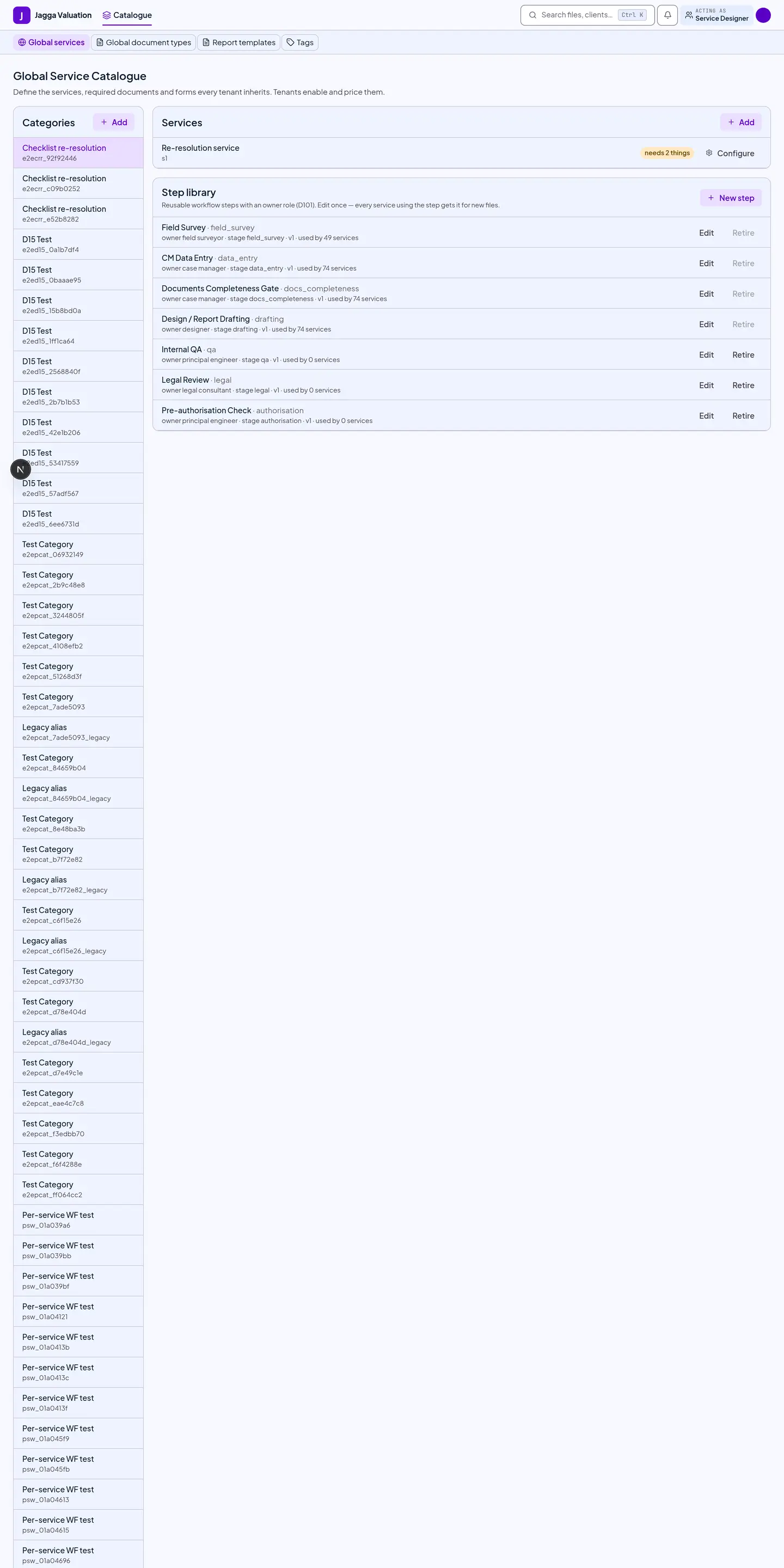
Press Configure on a service to open its console.
2. The service console
One service, one screen, in five tabs. A dot on a tab means that part is not configured yet.
| Tab | What it holds |
|---|---|
| Pricing | The price mode and the platform default price. Quoted is the normal case: the firm sets its own price, the Case Manager may negotiate down to the floor, and below the floor needs an administrator’s approval. Fixed means the quotation is issued at the configured price with no negotiation at all — use it where haggling makes no sense. Firms can change the price; only you can change the mode. |
| Documents | The checklist the client must satisfy. Each row is a document type from the registry, plus its constraints. A case created for this service gets a placeholder for every matching mandatory document automatically, and uploads are checked against the constraints you set here. |
| Form | The questions, grouped into screens. Each screen is tagged for a surface — intake (the client’s request wizard) or visit (the surveyor’s on-site capture). Within a screen you can make a question appear only when an earlier answer calls for it, make it required only in context (“the lift capacity, but only when the building has a lift”), and group questions that repeat — floors, rooms, buildings — so the surveyor adds one card per floor the property actually has. Publishing writes a new immutable version. |
| Workflow | The phases this service runs, composed from the step library. A step — Field survey, Technical review, Authorisation — is authored once, with the role that owns it, and reused across services. Publish a new version of a step and every service workflow using it is re-published automatically. |
| Formats | The report formats this service offers — typically one per bank — with exactly one marked default. The Case Manager picks among these when a file starts. |
3. Report formats
A format defines the report’s layout, its fixed text, its computed tables and its signature blocks. You create one by cloning an existing format — the built-in RBBL Valuation Procedure 2077 is the reference — and then editing its layout.
Preview renders with sample data, including the longest Nepali content, so text that would overflow shows up before you publish rather than in a delivered report.
A format that declares two signature blocks makes the file wait for the firm’s signatory after the engineer signs. That is worth knowing when you author one, because it changes how long a file sits before delivery.
Tips and gotchas
- A change reaches new files only. Every file locks onto the format version and the workflow version that were active when it started. Publishing a new version, or making a different format the default, changes what the next file gets — a file already in production is never re-plumbed under the engineer working on it. This is the single most important thing to understand about this role.
- A published version is immutable. Editing a format or a form creates a new version; the old one stays, because delivered reports must keep rendering exactly as they were issued.
- Layout and numbers are separate layers. A format change alters how the report looks, never the computed value. That comes from the calculation engine and the firm’s depreciation table, which belongs to the Principal Engineer, not to you.
- Every service is on for every firm by default. You do not enable a service per firm. The moment you publish it, every consultancy has it — unpriced until they price it, and switchable off if they do not offer it. So a half-finished service is visible: finish it, or leave it retired until it is ready.
- Nothing you retire is deleted. A retired service, step or format keeps every file that used it working. Retirement removes it from new choices, nothing more.
- You can’t link a firm’s own template to a service. Only platform formats can be plugged in — a service is inherited by everyone, so what it offers must be something everyone has.
Last reviewed 2026-09-08.